
When playing games online or chatting via Skype, it is quite common to quickly mute the microphone. In some cases, this is difficult and time consuming to do, and in others it is almost impossible. With the standard microphone mute in Windows, the user will have to go into the microphone settings and turn it off from there. This usually takes a fair amount of time. It is not comfortable. And therefore, over time, there was a need to accelerate this process. The MicSwitch PC microphone mute program will allow you to turn off the microphone in one click and more.
MicSwitch: Mic Switcher for PC
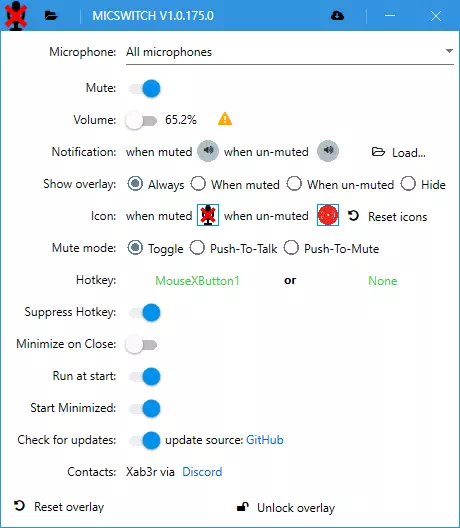
MicSwitch Utility is a free program for switching between audio devices in Windows, including muting the microphone. This is a very useful program that can be used in many situations where you need to quickly mute your microphone to avoid unwanted recording sound.
MicSwitch has a very simple interface which makes it very easy to use. After installing MicSwitch on your computer, you can easily switch between different sound devices, as well as mute the microphone with a few clicks.
When you need to mute your microphone, MicSwitch provides several options for doing so. You can right-click on the MicSwitch icon in the system tray and select Mute Microphone. You can also use a hotkey to quickly mute the microphone (and this can be done with audio).


MicSwitch also provides the ability to customize hotkeys, which allows you to set the program to quickly mute the microphone using the key combination you prefer.
In addition, MicSwitch can automatically mute the microphone when you switch to another audio device, such as when you connect headphones or an external microphone.


MicSwitch also has many other features that make it an even more convenient and useful tool for managing the sound on your computer. It can be used to quickly switch between audio devices, control audio levels, and more.
Download MicSwitch to mute the microphone
MicSwitch is available for free download on the developer’s GitHub website. Download links are provided below. This program is useful for users who frequently use the microphone on their computer or laptop and who want to be able to quickly mute the microphone at any time.
In conclusion, MicSwitch is a very handy free and open source program that makes controlling the sound on your computer faster and easier. It provides many features, including microphone mute, which makes it a very useful and easy-to-use PC program. If you often use the microphone on your computer, then MicSwitch will be a great choice for you. This program will help you to quickly mute the microphone at any time, as well as provide a number of other functions to control the sound on your computer.
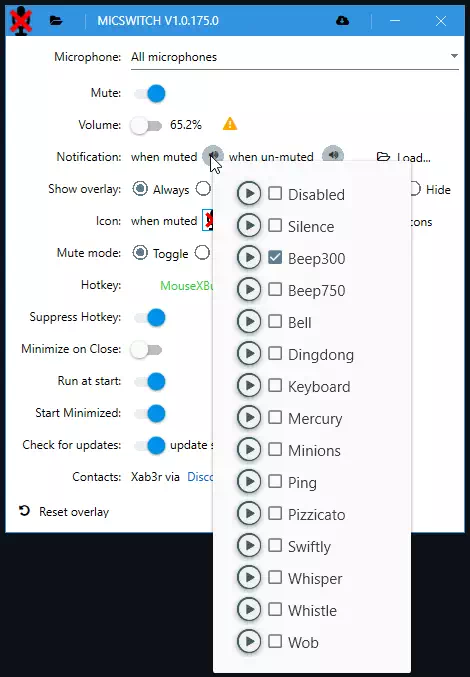
Screenshots
Tags
Download
See also:

 Recaps language changerIf you once had to work on a PC with more than one or two languages at the same time, then …
- Programs and online services for creating jokes and humorHumor is an irreplaceable thing in our lives. It not only lifts the mood, but also puts everyone in a positive …
- Website Blocker URL DisablerThere are a lot of situations and reasons why it is necessary to block a particular web page. For example, office …


- Free Xenu Link Checker: Features and InterfaceIn the world of web development and SEO, maintaining a healthy link structure is one of the biggest challenges. So-called broken …
- Program for the treatment of dead pixels. PixelHealerWhen buying new equipment, or even more so if the equipment was in use, we always check it for integrity. Why …
- How to develop your own Telegram Bot? Features OverviewSurely many have not only heard about the Telegram social network, but are already successfully using its resources. Here you can …


